Google Earth optimized for Android-powered tablets
Cross-posted from the Official Google Blog
When we launched Google Earth in 2005, most of us were still using flip phones. At the time, the thought of being able to cart around 197 million square miles of Earth in your pocket was still a distant dream. Last year, that dream came to fruition for Android users when we released Google Earth for Android. With the recent release of tablets based on Android 3.0, we wanted to take full advantage of the large screens and powerful processors that this exciting new breed of tablets had to offer.
Today�s update to Google Earth for Android makes Earth look better than ever on your tablet. We�ve added support for fully textured 3D buildings, so your tour through the streets of Manhattan will look more realistic than ever. There�s also a new action bar up top, enabling easier access to search, the option to �fly to your location� and layers such as Places, Panoramio photos, Wikipedia and 3D buildings.
Moving from a mobile phone to a tablet was like going from a regular movie theatre to IMAX. We took advantage of the larger screen size, including features like content pop-ups appearing within Earth view, so you can see more information without switching back and forth between pages.
One of my favorite buildings to fly around in Google Earth has always been the Colosseum in Rome, Italy:
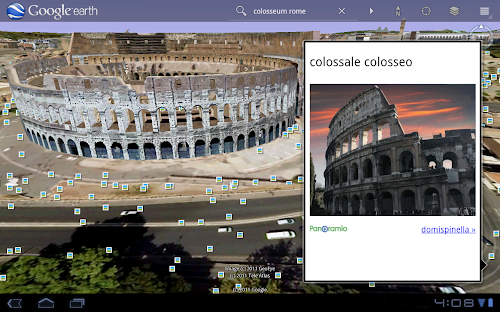
With the larger tablet screen, I can fly around the 3D Colosseum while also browsing user photos from Panoramio. The photos pop up within the imagery so I can interact with them without losing sight of the Colosseum and its surroundings. Also, by clicking on the layer button on the action bar, I can choose which layers I want to browse.
This version is available for devices with Android 2.1 and above. The new tablet design is available for devices with Android 3.0 (Honeycomb) and above. Please visit the Google Earth help center for more information.
To download or update Google Earth, head to m.google.com/earth in your device�s browser or visit Android Market. Enjoy a whole new world of Google Earth for tablets!
When we launched Google Earth in 2005, most of us were still using flip phones. At the time, the thought of being able to cart around 197 million square miles of Earth in your pocket was still a distant dream. Last year, that dream came to fruition for Android users when we released Google Earth for Android. With the recent release of tablets based on Android 3.0, we wanted to take full advantage of the large screens and powerful processors that this exciting new breed of tablets had to offer.
Today�s update to Google Earth for Android makes Earth look better than ever on your tablet. We�ve added support for fully textured 3D buildings, so your tour through the streets of Manhattan will look more realistic than ever. There�s also a new action bar up top, enabling easier access to search, the option to �fly to your location� and layers such as Places, Panoramio photos, Wikipedia and 3D buildings.
Moving from a mobile phone to a tablet was like going from a regular movie theatre to IMAX. We took advantage of the larger screen size, including features like content pop-ups appearing within Earth view, so you can see more information without switching back and forth between pages.
One of my favorite buildings to fly around in Google Earth has always been the Colosseum in Rome, Italy:

With the larger tablet screen, I can fly around the 3D Colosseum while also browsing user photos from Panoramio. The photos pop up within the imagery so I can interact with them without losing sight of the Colosseum and its surroundings. Also, by clicking on the layer button on the action bar, I can choose which layers I want to browse.
This version is available for devices with Android 2.1 and above. The new tablet design is available for devices with Android 3.0 (Honeycomb) and above. Please visit the Google Earth help center for more information.
To download or update Google Earth, head to m.google.com/earth in your device�s browser or visit Android Market. Enjoy a whole new world of Google Earth for tablets!
Category Article Android, google earth, tablet
